![logo - 512.png]](https://help.timeero.com/hs-fs/hubfs/logo%20-%20512.png?width=75&height=75&name=logo%20-%20512.png)

* If you have not turned on Multi-level Approvals in your account yet, please see our Article on Enabling Multi-Level Approvals to do so.
How do I See Which Timesheets my Employees Have Submitted?
- Go to the Time & Mileage Page.
- Select the Entry Approvals tab at the top of the page.
- You will see a list of your employees with a summary of all entries for each employee.
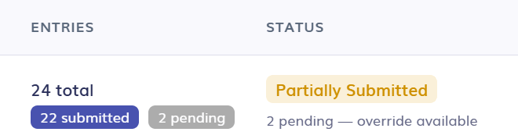
- Click the arrow button next to their name to see all individual entries.

- Scroll to the right side of the page to view the Submission status.
- Click the arrow button next to their name to see all individual entries.
What Does Each Status Mean?
- Submitted - Employee has submitted their entries.
- Pending - Employee has not submitted their entries.
- Partially Submitted - Employee has submitted some of their entries.
How do I Approve Entries?
- From the Entry Approvals tab, start by selecting the date range for the entries you want to review and approve (You can skip this step if you want to view all entries).
- Select the checkbox next to each user you want to approve, or the checkbox at the top of the page if you wish to approve all.
- If you only want to approve some entries from one user, use the dropdown arrow to view and select individual entries.
- Select Approve Selected.
- Add a Signature if required and select Continue.
- Fill in Custom fields if required and select Continue.
- Select whether or not you want approval notifications to be sent.
- Select Approve.
- Approved entries will move over to the approved tab.

FAQs
Do employees need to submit their entries before I can approve them?
No, Managers or Admins will still be able to approve entries even if employees have not yet submitted them. Unsubmitted entries that are approved will be marked as overridden.
Can managers submit their entries?
No, managers do not have the option to submit entries. Only employees submit their entries. Manager with approval permissions can approve their own entries or have another manager/admin approve them.