![logo - 512.png]](https://help.timeero.com/hs-fs/hubfs/logo%20-%20512.png?width=75&height=75&name=logo%20-%20512.png)

How do I Turn on Multi-Level Approvals in my Account?
- Go to Company Settings.
- Scroll down and turn on Enable Multi-Level Approvals.
- Click Save.
- Select Approval Settings on the left hand side.
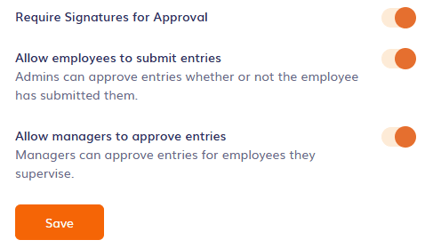
- Turn on the approval settings you want to enable.
- Click Save.
What Does Each Approval Setting do?
- Turn on Require Signatures for Approval to prompt users to add a signature during the approval and submission process.
- Turn on Allow employees to submit entries to give employees the option to review and submit their own entries for approval.
- Turn on Allow managers to approve entries to give managers the ability to approve entries.
* Admins will always be able to approve entries. If an admin approves an entry, managers will no longer need to.