![logo - 512.png]](https://help.timeero.com/hs-fs/hubfs/logo%20-%20512.png?width=75&height=75&name=logo%20-%20512.png)
In this article
- Where to find your invoices
- What the line items represent
- Example: reading a prorated invoice
Where to find your invoices
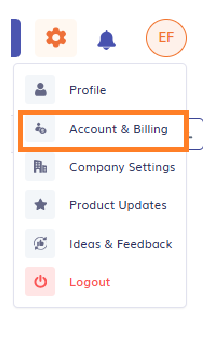
- Click your profile picture or initials in the top right-hand corner of the screen.
- Select Account & Billing.
- There, you can see your next billing date, the amount that will be charged, and all of your invoices.
- The invoice list shows some key details like the billing period, payment status, payment date, and total.
- To view the invoice, select the PDF link in the Download Invoice section. You can download one at a time.
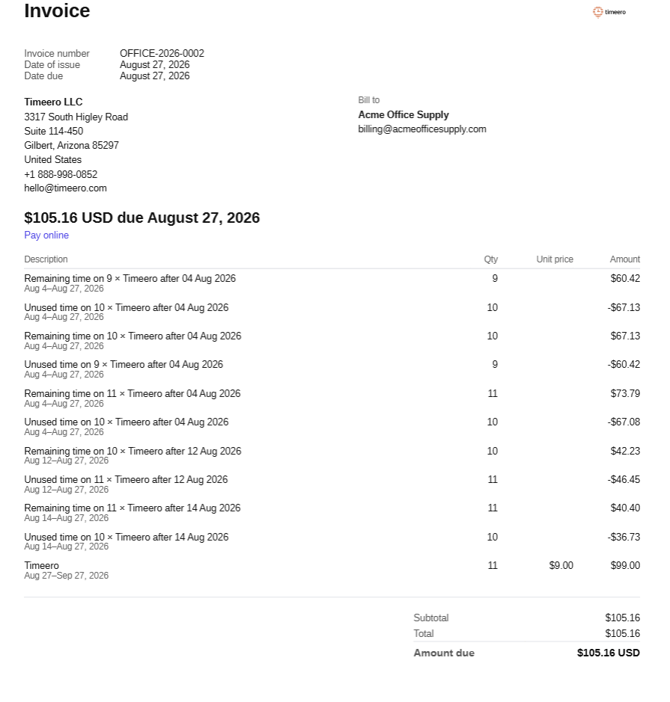
Here is an example of what your downloaded invoice PDF might look like.
Timeero bills per active user, per billing cycle.
For Monthly users: If your active user count changes mid-cycle, Timeero adds two lines to your next invoice for every adjustment made since your last payment.
For Annual users: If your active user count changes mid-cycle, Timeero creates a new invoice the same day the changes happen.
What each line item means
- Remaining time on How many active users × Timeero. A charge for your new user count, for the days remaining in the billing cycle after the change.
- Unused time on How many active users × Timeero. A credit for your old user count, for that same stretch of remaining days. This amount is negative.
Because the charge and the credit cover the same days, they mostly cancel out. What is left over is the small difference between what you were already billed for and what you actually used.
The last line on the invoice is not proration. It is the regular charge for your upcoming billing period, billed in advance at your plan's per-user rate.
Example: reading a prorated invoice
Here is invoice billed to Acme Office Supply for $105.16. It has eleven lines, but it only represents two things: a small proration true-up and next month's charge.
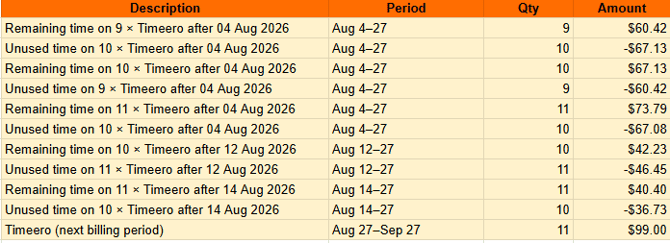
Group the lines by date and amount. Doing this shows five user-count changes: three on August 4, one on August 12, and one on August 14.
- Net each pair (charge plus credit):
- August 4, first change: $60.42 − $67.13 = -$6.71.
- August 4, second change: $67.13 − $60.42 = $6.71.
- August 4, third change: $73.79 − $67.08 = $6.71.
- August 12 change: $42.23 − $46.45 = -$4.22.
- August 14 change: $40.40 − $36.73 = $3.67.
- Add the five net amounts together: -$6.71 + $6.71 + $6.71 − $4.22 + $3.67 = $6.16. This is the true cost of the mid-cycle changes.
- Add the last line, which is the regular renewal charge: 11 users × $9.00/user = $99.00 for the next billing period.
- Add the proration true-up and the renewal charge together: $6.16 + $99.00 = $105.16. This matches the invoice's subtotal, total, and amount due.
A prorated invoice can look intimidating because every user-count change gets its own credit-and-charge pair, but the math always reduces to two things: a small true-up for changes made during the billing period, and the flat charge for the users you are carrying into the next one.
FAQs
I still don't understand. How can I get help?
If your invoice does not reconcile the way you expect, contact Timeero support with the invoice number and we will walk through it with you.