![logo - 512.png]](https://help.timeero.com/hs-fs/hubfs/logo%20-%20512.png?width=75&height=75&name=logo%20-%20512.png)
Learn How to:
- Connect Viventium to your Timeero account.
-
Export payroll data, PTO, holiday hours, mileage, custom hours, and time-off requests from Timeero to Viventium.
How do I Enable the Viventium Integration?
- Go to the Integrations tab on your web portal.
- Select Viventium.
- Go to Configuration.
- Click Enable.
- Enter your Viventium Username and Password.
- Click Connect.
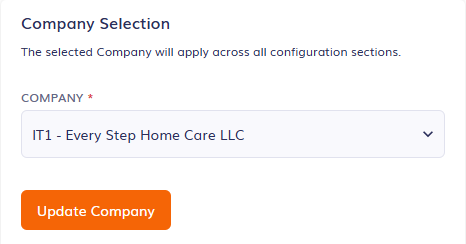
- Select your Company from the drop down and then select Update Company.
How do I Configure the Settings for Viventium?
-
On the Right hand side of your Configuration page, you will see a list of Settings.
- Click the checkbox next to any settings you would like to use then click Save at the bottom of the page.
*To learn more about the settings available and how to configure them, please see our Viventium Settings Article Here.
How do I Export to Viventium?
- Once connected, go to the Reports page in Timeero.
- Select the Report by Date Range.
- Enter the date range for your payroll period and generate the report.
- Select Export.
- Select Export to Viventium.
- Select your company and the payroll period. Your company must match the company you selected in your integration configurations.
- Select Proceed.
- You can check the bell icon
 at the top of your screen to see if the export was successful.
How do I Send Custom Hours to Viventium?
- Go to the Integrations tab and select Viventium.
- Select Configuration.
- Go to Configure Mappings.
- Select Custom Hours at the top of the page.
- Select Add Custom Hour.
- Select the User, Payroll period, and Earning code.
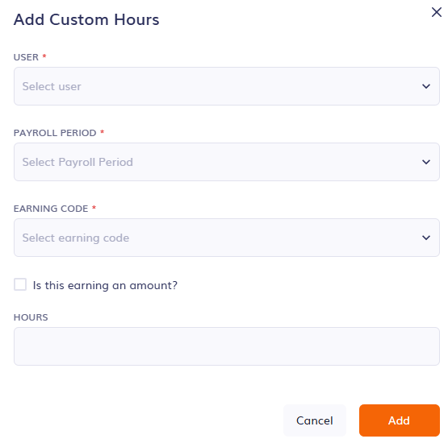
- You can choose to export a dollar amount or hours.
- If a dollar amount, check the box next to Is this earning and amount? Then add the dollar amount in the Hours box.
- If hours, enter the hours in the Hours box.
- Select Add.
- The Custom Hours will be sent when you export your Report by Date Range to Viventium.
*The payroll period must match the payroll period in Viventium and the date range for the report you are running.
Where do I Find my Exported Data in Viventium?
To find your exported data in Viventium, please refer to the Exported Data Article Here.
FAQs
Can I use a different report to export to Viventium?
No, the Viventium integration is only compatible with the Report by Date Range.
Why is my mileage not exporting?
Mileage exports are only available when Enable Company Code is enabled.