![logo - 512.png]](https://help.timeero.com/hs-fs/hubfs/logo%20-%20512.png?width=75&height=75&name=logo%20-%20512.png)
Learn How to:
- Edit existing timesheets through the web portal.
- How and when to recalculate mileage.
*Employees and Managers will need permission from their admins to edit timesheets.
How do I Edit Timesheets on the Web Portal?
- Navigate to the Time & Mileage Page.
- Select a user from the left side of your screen.
- Click on the timesheet you want to edit.
- Select the Edit button.
- Here you can edit the user, job name, task name, mileage amount, clock in/out times, breaks, photos, and notes.
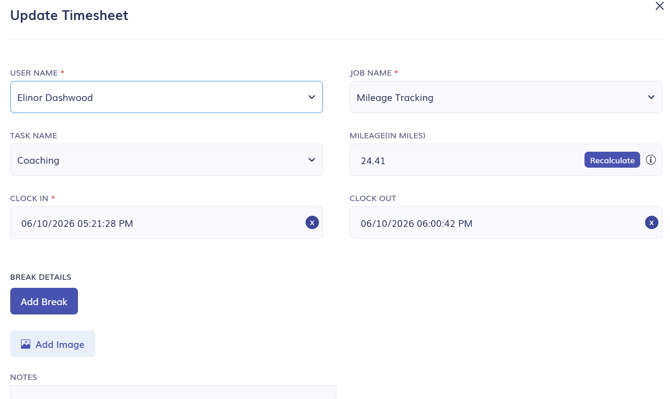
- Click Save at the bottom of the page.
*Edits made on current timesheets will not save. Please wait until a user is clocked out for the day to edit their timesheet.
When Should I Recalculate Mileage?
- When you edit a timesheet and make it shorter. Recalculating the mileage will remove any mileage outside of the hours worked.
- There are breadcrumbs on the timesheet but no mileage is showing or mileage is incorrect.
- You are using Commute mileage and you want to remove the commute mileage from a specific timesheet.
How do I Recalculate Mileage?
- Ensure that other edits have been made and saved before recalculating mileage.
- On the edit page, select Recalculate next to the mileage.

How do I Edit Timesheets Through the Other Time & Mileage View?
- If you prefer the list view on the Time & Mileage Page, you can select the List icon at the top of the page.

- Select the pencil icon on a timesheet to edit it.
- Make the necessary changes.
- Click Save at the bottom of the page.
FAQs
How do I edit approved timesheets?
Approved timesheets cannot be edited. You will have to un-approve the timesheet to edit it.
How do I edit my user's starting location or breadcrumbs?
Starting location and breadcrumbs cannot be edited.