![logo - 512.png]](https://help.timeero.com/hs-fs/hubfs/logo%20-%20512.png?width=75&height=75&name=logo%20-%20512.png)
Learn How to:
- Edit existing timesheets on the Mobile App.
- Delete timesheets on the Mobile App.
*Employees and Managers will need permission from their admins to edit timesheets.
How Can I Edit my Timesheets on the Mobile App?
- Navigate to the Entries page on your app.
- Click on the timesheet you want to edit.
- Select the Pencil Icon in the top right corner of your screen.
- Here you will be able to edit the employee (only admins or managers), the start and end times, mileage, Job/task, notes, breaks, and custom fields.
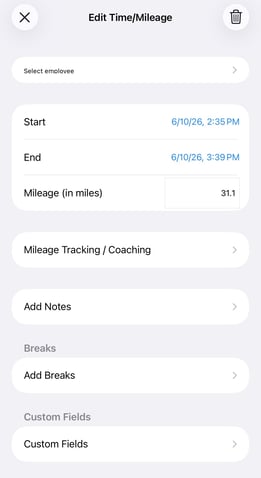
- Click on the X icon in the top left of your screen.
- Select the back arrow to exit the timesheet and save the changes.
How Can I Delete Timesheets?
- You can delete your timesheets in the mobile app, by clicking the trash can icon instead of the edit icon.
- This will remove it from the mobile app as well as the web portal, so any time or mileage associated with it will also be removed.
Deleting timesheets is permanent and cannot be undone.
Please make sure you are only deleting timesheets that you do not want accounted for. If you accidentally delete a timesheet, you will need to contact your admin and have them manually add it back in if you do not have permission to add time for yourself.
FAQs
Where is the save button?
There is no save button on the mobile app. Changes save automatically, but you do have to exit out of the timesheet using the X icon to see the changes applied.
Why can't I make edits to my timesheets?
Your admin will need to give you user permission of Add, Edit, & Delete Time/Mileage in order to make edits on your timesheets. They can do this in the User's tab of the web portal < Update User < Additional Settings.