![logo - 512.png]](https://help.timeero.com/hs-fs/hubfs/logo%20-%20512.png?width=75&height=75&name=logo%20-%20512.png)

Learn:
-
What California premium pay is.
-
When it’s required for missed or late breaks.
-
How Timeero can automatically track and calculate it for your team.
What is California Premium Pay?
-
California Premium Pay is an additional hour of pay at the employee's regular rate for each workday when a meal or rest period is not provided, as required by law.
-
If an employee works through their meal or rest breaks, they will be compensated for it.
-
For example, if an employee works 8 hours at $20 per hour and skips both their meal and rest breaks, they will receive an extra $40 where $20 is for the missed meal break and $20 is for the missed rest break.
To use Premium Pay you will need to have California Overtime Rules and California Breaks set up first and assigned to the correct users.
What is the Premium Pay Report?
- This report shows how many breaks we expected the user to take according to California law. It then compares how many of their assigned California breaks they actually logged with Timeero during their shift.
- If the expected and actual numbers don't align, a Premium pay or Penalty will be applied and shown there. The Premium Pay is calculated by the user's pay rate in Timeero.
How Can I Run a Premium Pay Report?
-
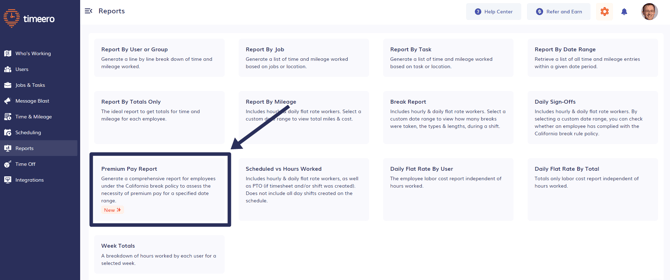
Go to Reports.
-
Choose Premium Pay Report.
-
Select the date range.
-
Once the report is generated it can be Exported as either a CSV or a PDF.
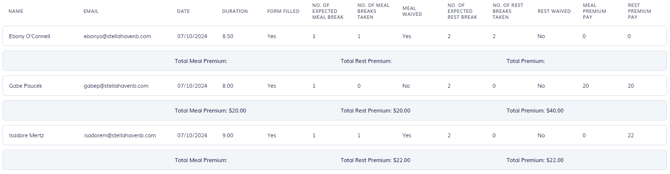
If a line is highlighted in Red, this means the meal and/or rest breaks for this timesheet were waived by an admin from the Daily Sign-Offs Report.
The "Premium Pay Report" only shows the timesheets where the California Break form has been filled out, not those that are added manually.
How Can I See Premium Pay in Other Reports?
-
In Company Settings, in the Reports settings, you can choose to Include Premium Pay in your other reports.
-
This will add any penalties determined by our system (as shown in the Premium Pay Report) to the user's total hours cost.
For more information about the California meal premium requirements, read our blog about California Premium Pay here.
FAQs
Are there different premium pay rules for meal breaks versus rest breaks?
California law treats meal break and rest break penalties the same—one hour of pay at the regular rate for each type of break not provided. However, the requirements for when these breaks must be offered differ based on hours worked, which is why we track them separately and apply penalties accordingly.
Why am I not seeing a premium pay on the Premium Pay Report?
If a premium doesn’t appear, common reasons include: the California break form wasn’t completed for that shift, the timesheet was added manually instead of via the app, the user isn’t assigned to the California break rules.
Do I need to manually calculate premium pay penalties for my California employees?
No, Timeero automatically calculates premium pay penalties based on the employee's regular pay rate and the breaks they were expected to take versus what they actually logged. The system compares expected breaks under California law with actual logged breaks and applies penalties accordingly.