![logo - 512.png]](https://help.timeero.com/hs-fs/hubfs/logo%20-%20512.png?width=75&height=75&name=logo%20-%20512.png)
Learn How to:
- Add new timesheets to the mobile app manually.
*Employees and Managers will need permissions from their admin to add timesheets manually.
How do I Add a Timesheet Manually on the Mobile App?
- Navigate to the Entries page on your app.
- Click the + icon in the top right corner of your screen.
- Enter the timesheet details.
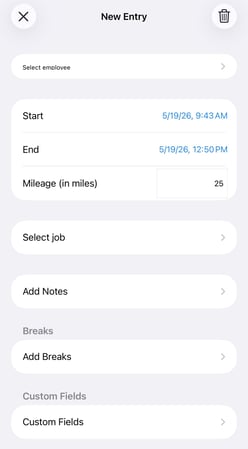
4. Select the X in the top left side of your screen to save the timesheet.
FAQs
How do I know that a timesheet was saved successfully?
Exit out of the timesheet that you created. You should now see it listed on the Entries page of your app.